• Home
  • Buying
  • Download
  • Support
  • Examples
  • Blog

Call us (952) 223-1293

info@visibility.biz
Visibility.biz Visibility.biz Visibility.biz Visibility.biz
  • Home
  • Buying
  • Download
  • Support
  • Examples
  • Blog

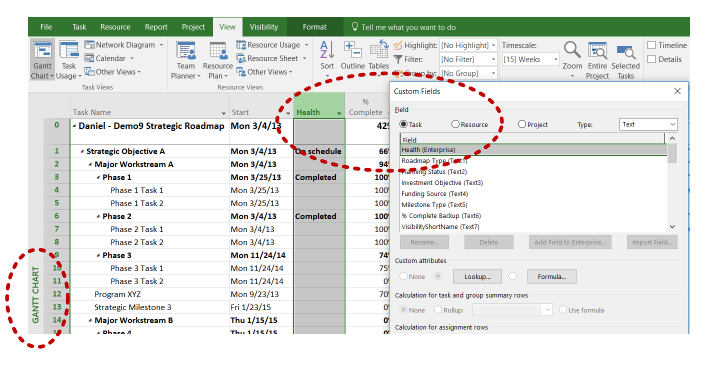
How do I get my Project Online Enterprise fields to be brought in to the Swimlane Timeline?

How do I get my Project Online Enterprise fields to be brought in to the Swimlane Timeline?

The Swimlane Timeline will read in all of the Project Online Enterprise Fields that are showing in the Gantt Chart view.  Make sure that MS Project is showing the Gantt Chart view, and then Insert Columns for the Enterprise Fields that you want read in to the Swimlane Timeline.
Share

Search

Recent Posts

  • How can I use the Swimlane Timeline v10 custom milestone shapes in the Demos folder?
  • How do I share a custom Style with others?
  • How can I use a custom task text field (e.g., Text23) instead of the default “Name” field as my task label?
  • The Swimlane Timeline menus are no longer showing in Visio. How can I fix this?

Quick Connect

About us

Visibility.biz is an award-winning consulting group with leading experts on Microsoft® Office Visio® offering products and consulting services to help organizations best leverage their Visio investment.

Get in Touch

  • Visibility.biz
  • 204 7th St W #118, Northfield, MN 55057
  • (952) 223-1293
  • info@visibility.biz

© 2026 · Visibility.biz

  • Home
  • Buying
  • Download
  • Support
  • Examples
  • Blog