
• Home
  • Buying
  • Download
  • Support
  • Examples
  • Blog

Call us (952) 223-1293

info@visibility.biz
Visibility.biz Visibility.biz Visibility.biz Visibility.biz
  • Home
  • Buying
  • Download
  • Support
  • Examples
  • Blog

The Swimlane Timeline menus are no longer showing in Visio. How can I fix this?

The Swimlane Timeline menus are no longer showing in Visio. How can I fix this?

Windows can sometimes turn off all application add-ins. If you don’t see the Swimlane Timeline menus in Visio anymore when starting the Swimlane Timeline from the desktop shortcut, then try the following:

Go to “Visio/Files/Options/Add-ins” and change the “Manage” option, located at the bottom of the dialogue, from “COM Add-ins” to be “Disabled Items” instead and select “Go…”
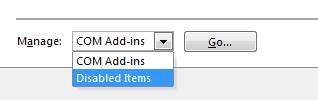
If you see that the Swimlane Timeline is currently disabled, then select it, and re-enable it. Close Visio, and restart the Swimlane Timeline from the desktop shortcut and you will now see the Swimlane Timeline menus are again visible.

 

Share

Search

Recent Posts

  • How can I use the Swimlane Timeline v10 custom milestone shapes in the Demos folder?
  • How do I share a custom Style with others?
  • How can I use a custom task text field (e.g., Text23) instead of the default “Name” field as my task label?
  • The Swimlane Timeline menus are no longer showing in Visio. How can I fix this?

Quick Connect

About us

Visibility.biz is an award-winning consulting group with leading experts on Microsoft® Office Visio® offering products and consulting services to help organizations best leverage their Visio investment.

Get in Touch

  • Visibility.biz
  • 204 7th St W #118, Northfield, MN 55057
  • (952) 223-1293
  • info@visibility.biz

© 2026 · Visibility.biz

  • Home
  • Buying
  • Download
  • Support
  • Examples
  • Blog